CoachArt
Reimbursement Portal
TEAM
2 PMs, 2 designers, 7 engineers
ROLE
Product Designer
Timeline
20 weeks
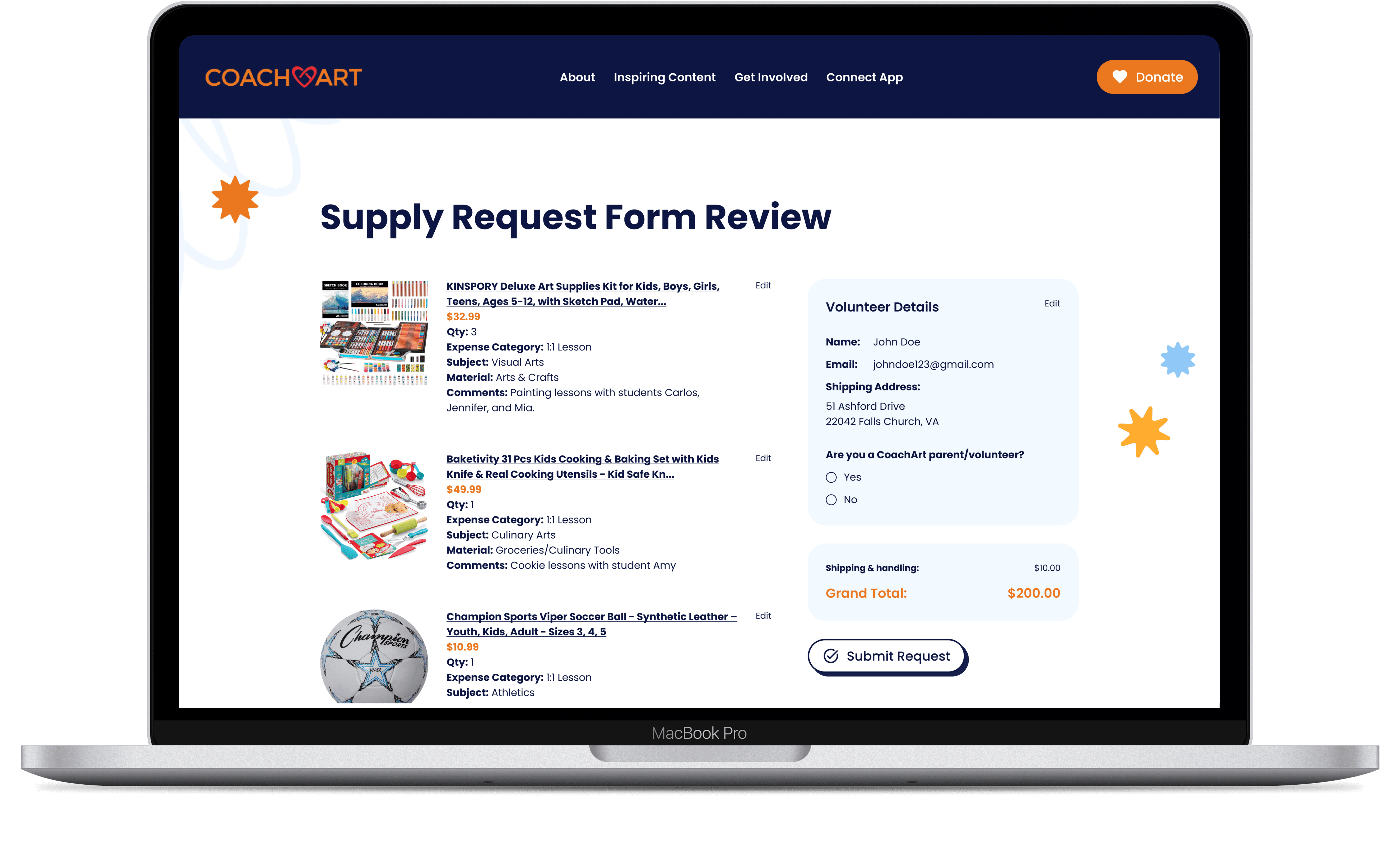
impact
90%
reduction in reimbursement workflow steps
cutting a 20 page form down to a streamlined 2-3 step process
450+
volunteers and teachers onboarded
improving adoption and usability across CoachArt’s programs
60+
reusable design system components
built for scalability and future nonprofit finance workflows
Context
Meet the client
CoachArt is a nonprofit that provides in-classroom experience to children with chronic illnesses by pairing them with over 450 volunteer teachers.
To support these volunteers in providing arts and enrichment classes, the organization funds classroom supplies and reimburses teachers for out-of-pocket expenses.

Internal roadblocks in CoachArt
The reimbursement system was disjointed and full of friction, creating bottlenecks for administrators and confusion for volunteers. This led to:
frustrated volunteers
delayed reimbursements
wasted staff time
Objective
Design an expense management system that simplifies teacher submissions and reduces manual effort for administrators.
Research
Current Landscape
2 ways to request a reimbursement
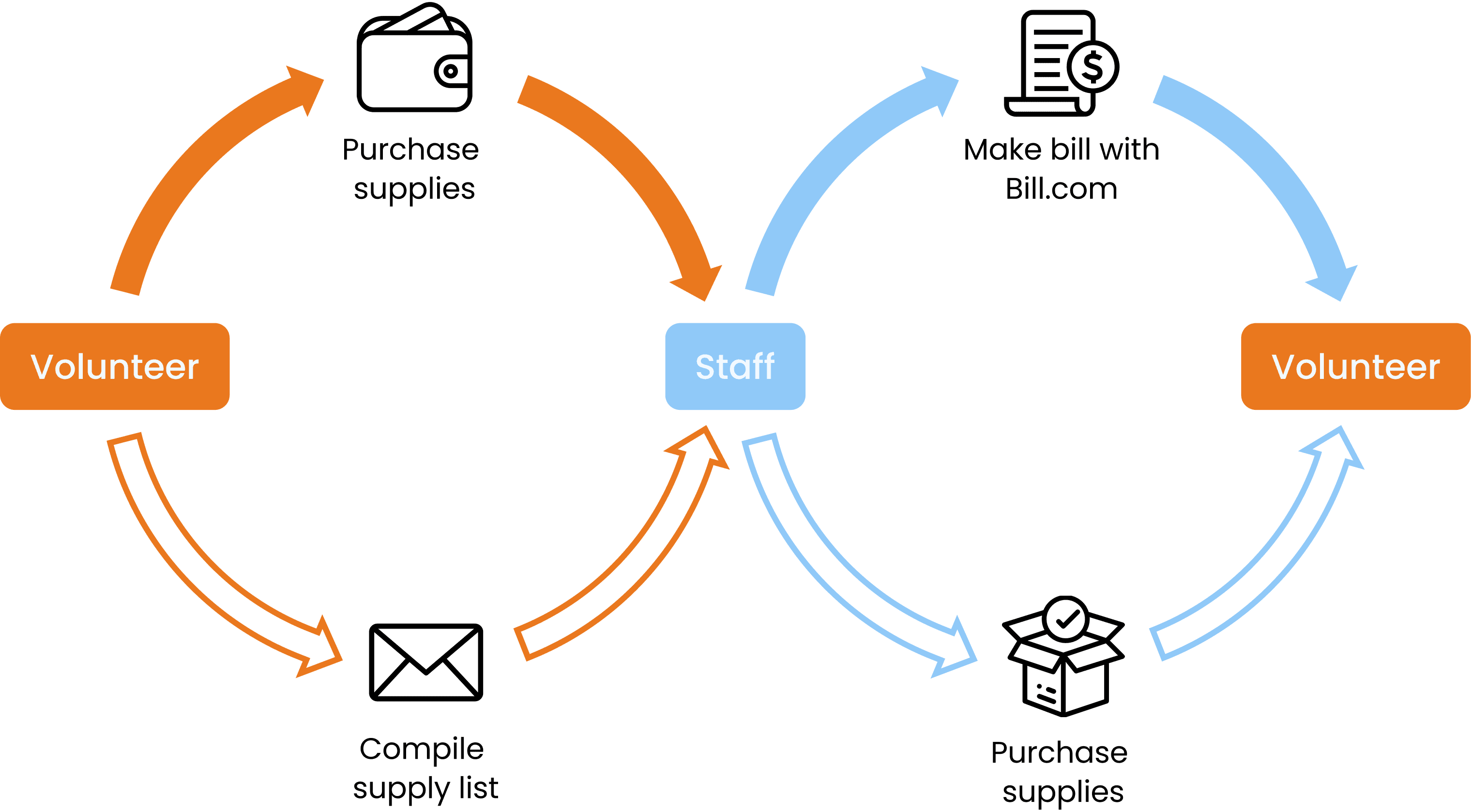
CoachArt volunteers can submit financial requests in two ways. They can file a reimbursement request after purchasing teaching supplies out of pocket by uploading physical receipts for CoachArt to generate a bill, or submit a supply request by sharing e-commerce links so a manager can purchase and ship the supplies directly to the volunteer.
On the other end, administrators had to manage reimbursement and supply requests through disjointed systems, juggling emails, Google Forms, and Bill.com.
While we understood the steps of the process, we didn’t yet understand the frustrations and emotional friction users felt at each stage, so that became our focus as we dived into user research over the first 2 weeks.
User interviews
Frustration found on both front and back end
To understand the pain points behind CoachArt’s reimbursement process, we conducted interviews with volunteers and CoachArt staff alike as well as a heuristic evaluations of the existing 20-page Google Form. This helped us uncover not just the procedural steps but also the emotional friction users felt at each stage.

Volunteer
“I want to have a simpler and clear way to request supplies and submit reimbursements.”

Operations Specialist
“I want to create bills within Bill.com with minimal manual effort.”

Volunteer Manager
“I want to better organize Amazon purchases to easily reconcile with business statements.”
User Personas
Introducing the key players

Mark (32)
A CoachArt volunteer, Mark spends his weekends teaching art to children at the local hospital.
Wants
Intuitive forms with easy navigation
Clear updates on his reimbursement

Ann (57)
Ann manages CoachArt's accounts, tracking the ins and outs of the organization's finances.
Wants
Efficient request review and approval
Reduced redundancy in workflows
User Journeys
Requesting a reimbursement
After purchasing supplies from his local art store, Mark opens CoachArt's reimbursement form to get reimbursed for his purchases.
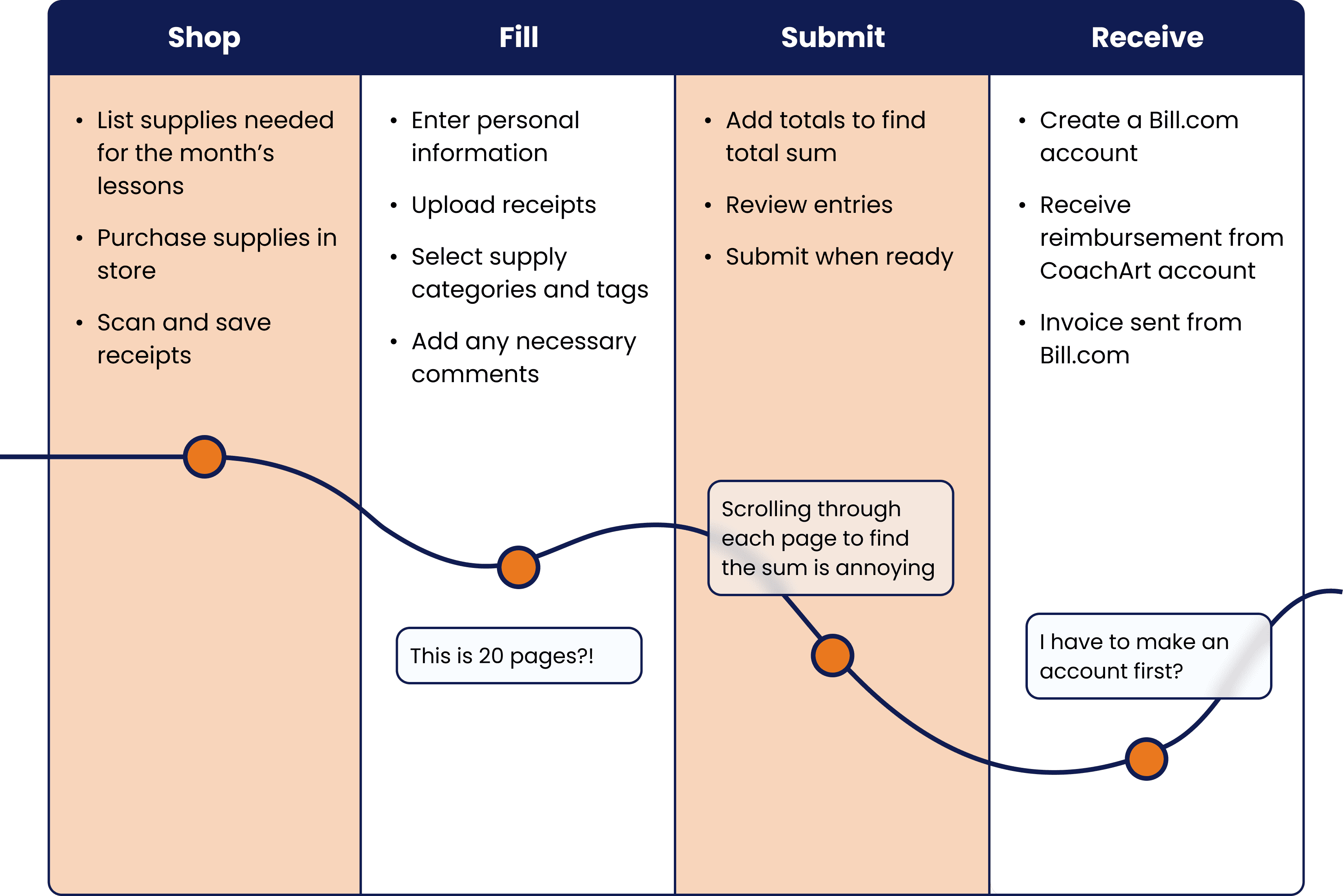
Mark felt it was frustrating to navigate through multiple pages to edit entries or calculate totals.
Processing a reimbursement
On the other end, Ann sees Mark's incoming request and opens it up for approval.
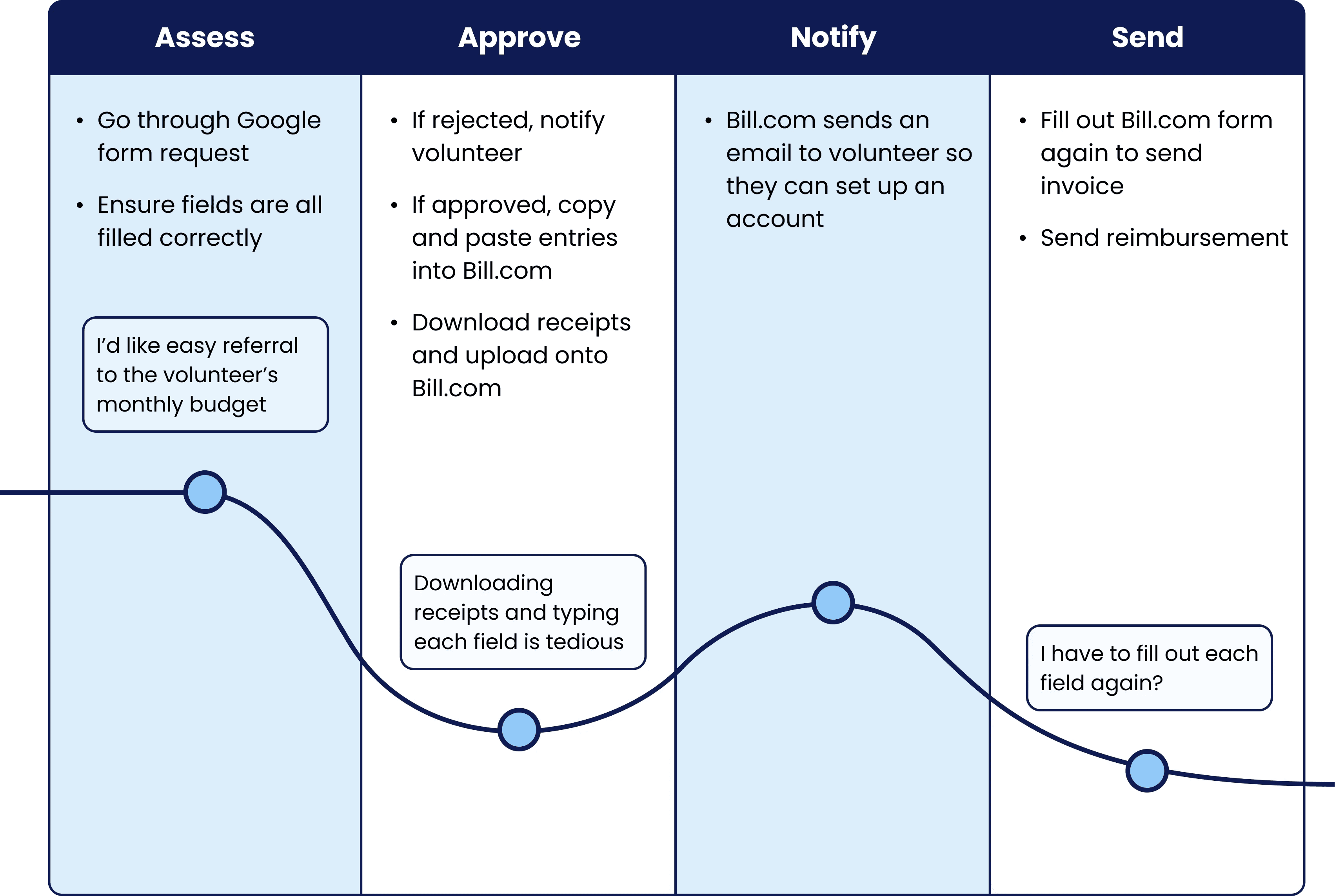
For Ann, the biggest challenge was sending feedback to correct form errors and copying data manually into Bill.com.
Ideate
User needs
Translating the objective into user needs
Build a reimbursement hub that consolidates volunteer submissions and reduces manual effort for administrators.

Digital forms

Automatic invoice generation

Transparent communication
Approach
Centering ideation around user needs
For each idea, we weighed its impact against its feasibility and tradeoffs.
Need: digital forms
Database of user accounts and saved profiles
We initially thought of creating a database of user accounts and saved profiles which would allow us to store volunteer info like their address and monthly budget.
Benefits
Store volunteer info and reduce redundant form filling
Track volunteer monthly budget
Tradeoffs
Added complexity and workspaces
Breaching project scope
Ultimately, we didn't continue with this proposal because it shifted the project away from a reimbursement hub and towards client management. We decided that digital forms were a simple yet effective solution.
Final solution
Digital forms with file upload support
Need: Transparent Communication
Automated messaging with pre-written emails
We explored automated messaging using pre-written email templates to keep volunteers informed of status changes without requiring administrators to manually draft responses for each request.
Benefits
Fosters transparency
Friction-less, no need to navigate away from workspace
Tradeoffs
Inflexible communication
Admin is unable to send personalized feedback
With the tradeoffs in mind, we moved away from fully templated communication and instead designed a system that balanced automation with human input, allowing admins to send targeted feedback directly within each request while still maintaining clear status updates for volunteers.
Final solution
Semi-automated messaging system
Need: Automatic invoice generation
Chrome extension for Bill.com
We considered a Chrome extension for Bill.com which would save data from a reimbursement request and then autofill the invoice fields in Bill.com.
Benefits
Automatically input invoice data into Bill.com
Tradeoffs
Bill.com seems to be incompatible with Chrome
Deployment limitations
Yet, we ultimately dropped this idea due to deployment limitations and compatibility issues with Bill.com’s Chrome support. Additionally, this solution still did not resolve the account creation roadblock.
Stumped by Bill.com until…
After researching Bill.com’s APIs, we discovered its automatic PDF parsing feature, which could extract and autofill invoice fields directly from a PDF and also automatically generate new user accounts based on that data.
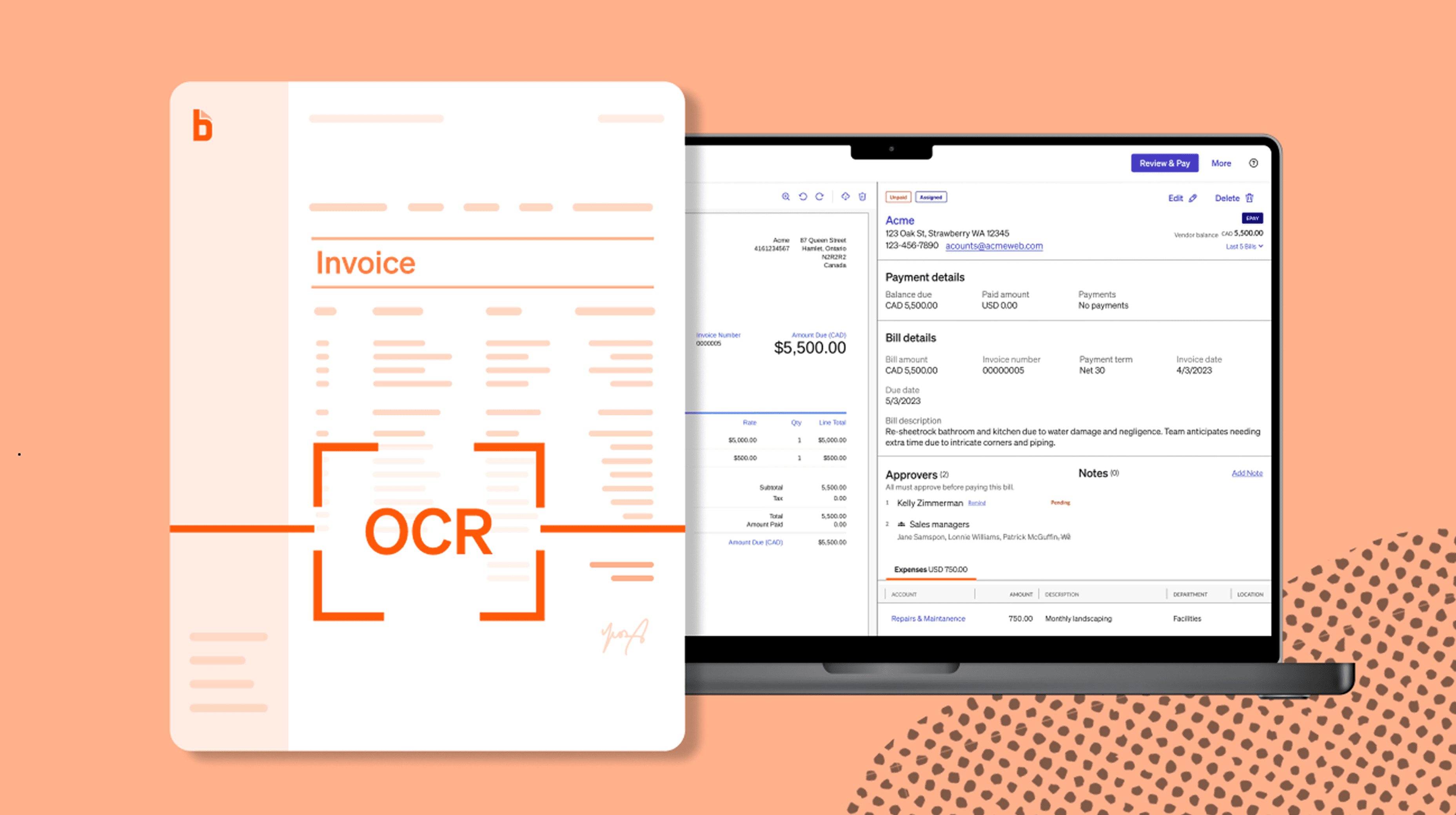
This feature parses PDFs with optical character recognition (OCR)
By building a PDF generation system on our end, we would be able to integrate seamlessly with Bill.com’s process, thus resolving administrator frustration and redundancy.
Final solution
PDF invoice generator
Synthesis
Solution
A 2-way ecosystem


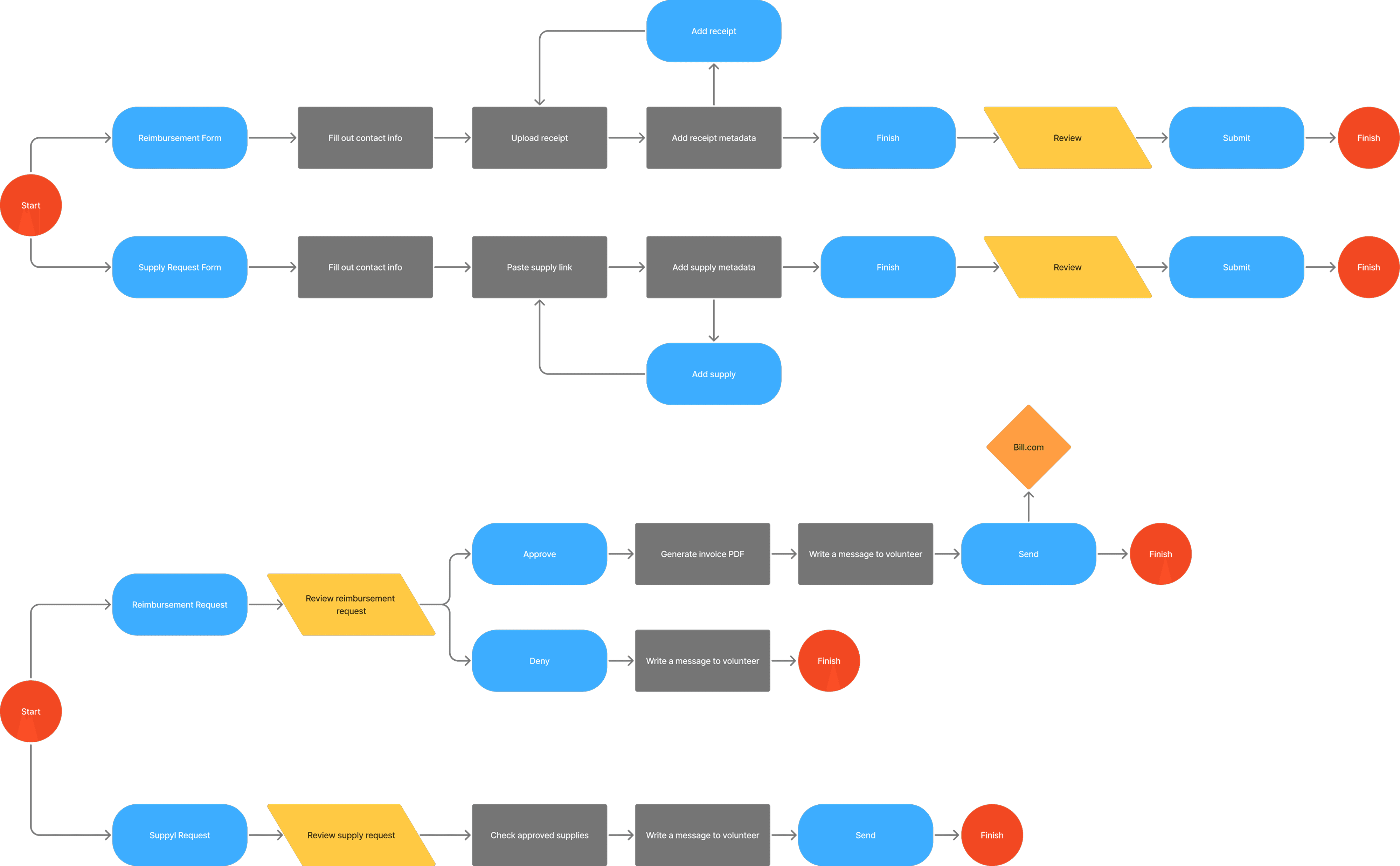
Our ultimate solution was a two-way ecosystem with a customer-facing end and a matching admin portal.
User flow
Mapping both sides of the workflow
We also mapped the user and data flow within the system, from a volunteer’s form submission, through admin review, to final integration with Bill.com. This visual helped all teams align on data consistency and traceability
Design
Wireframes
Low-fidelity designs
We began by building low-fidelity prototypes for three key workflows: the volunteer-facing reimbursement and supply request forms and the admin approval process
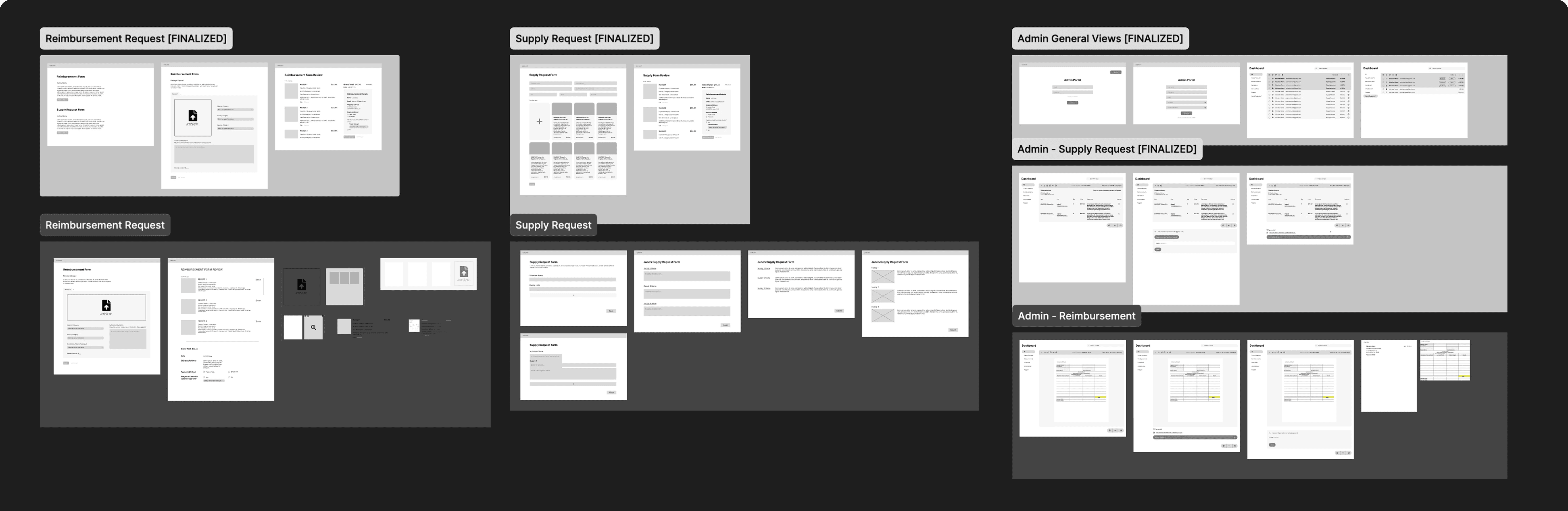
While designing the lofis, I focused on maintaining consistency and parallelism in volunteer flows to resolve the disconnection volunteers mentioned, ensuring our information architecture aligned with CoachArt’s existing processes, and documenting the user flow clearly to facilitate developer handoff.
iteration: Reimbursement Form
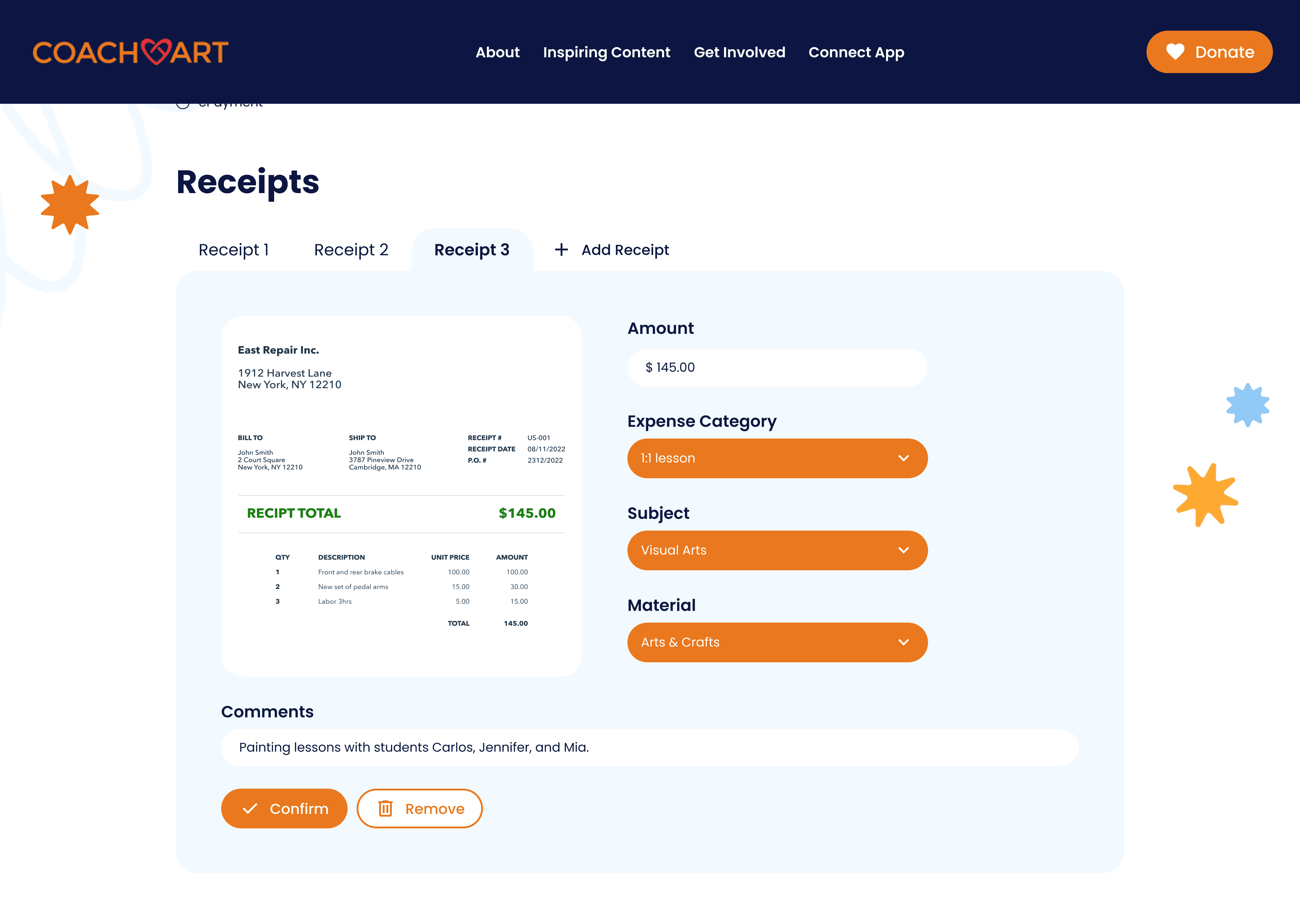
From rows to tabbed interface
User feedback revealed that volunteers often made edits to previous entries so to better facilitate this, I suggested a tabbed interface, that allowed for easy editing and switching, but still maintained a clear overview of the user’s progress.
Old
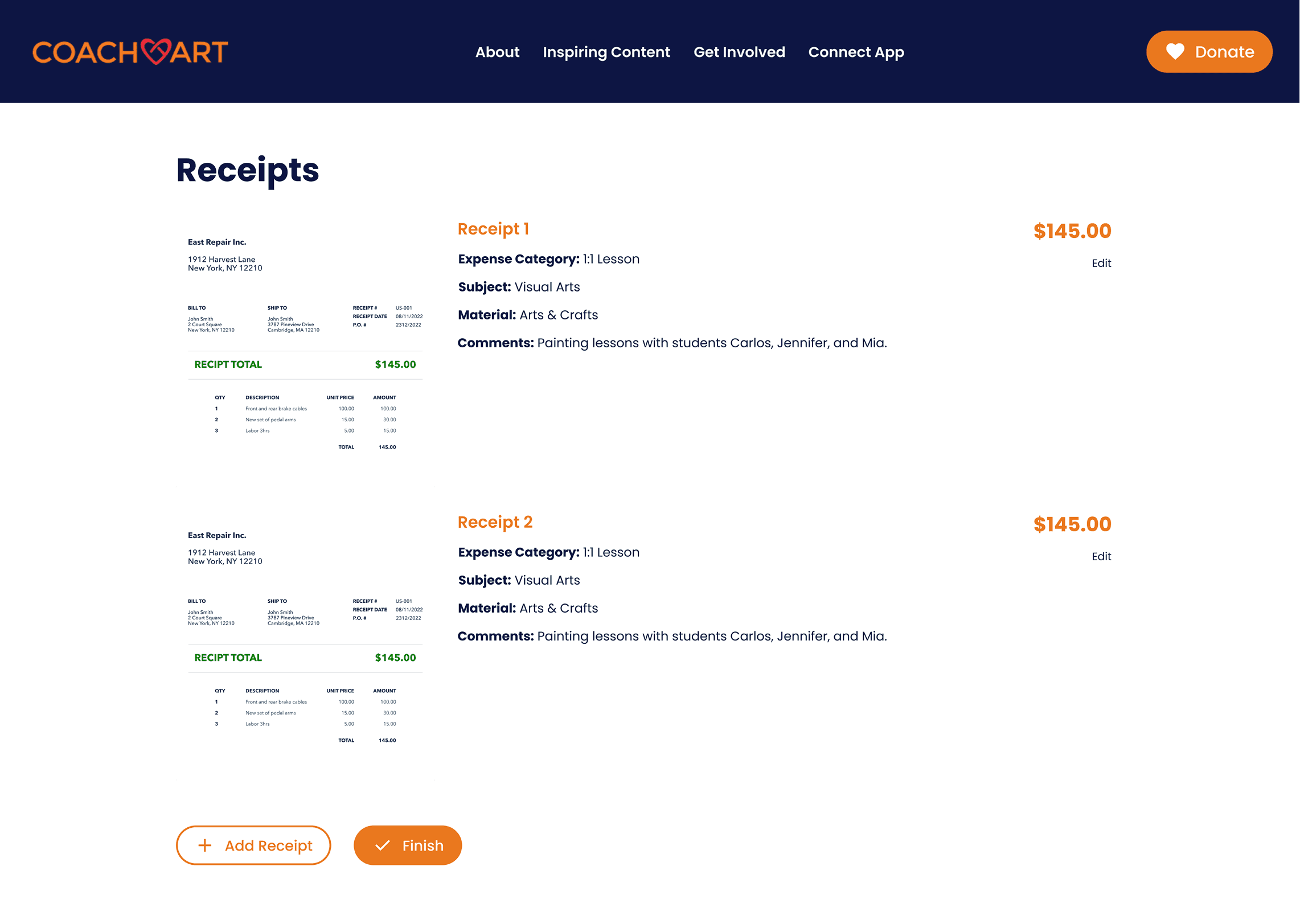
New
iteration: Supply Request
Aligning with familiar layouts
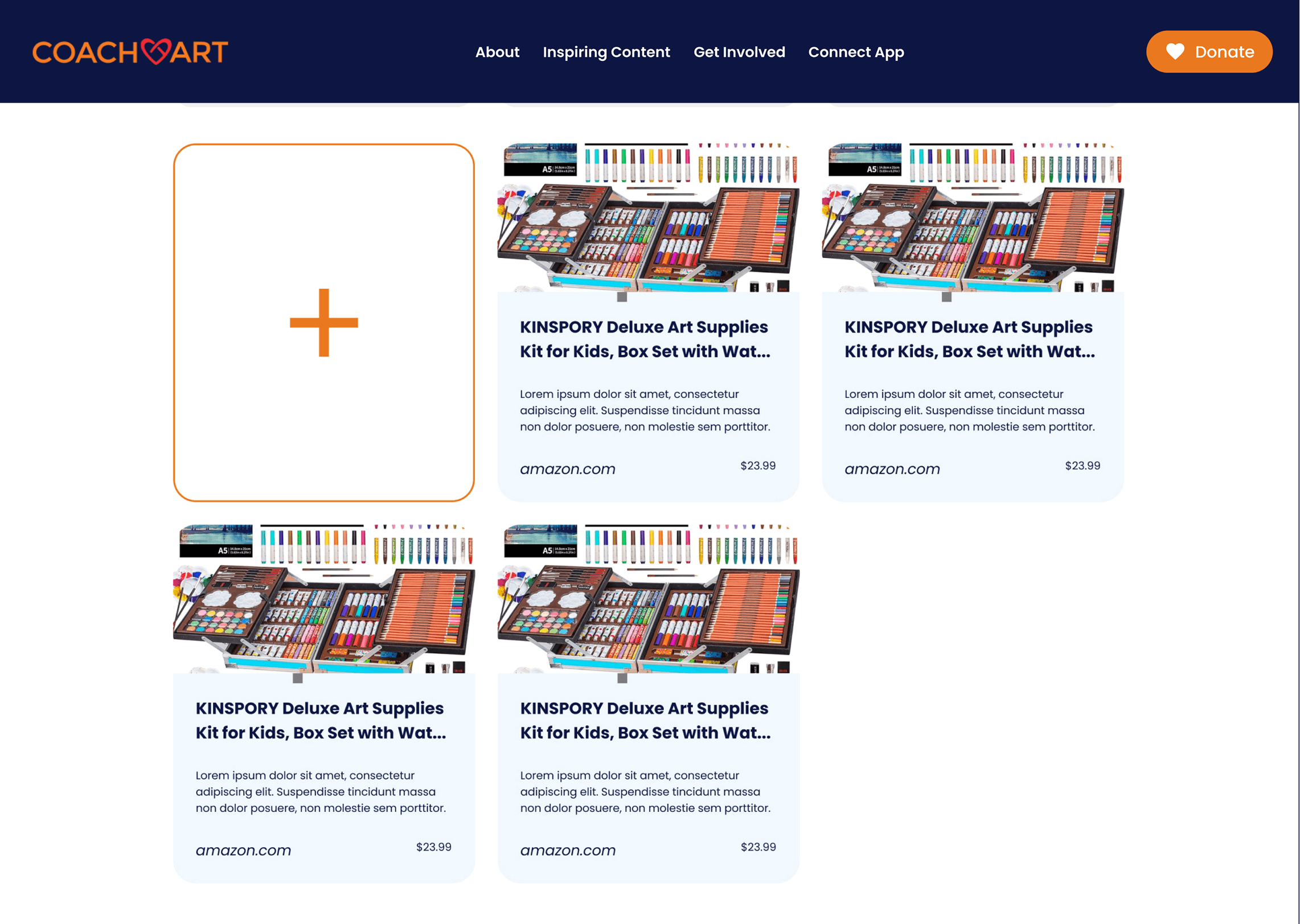
Our early supply request designs focused on modularity and visuals. However, we realized users naturally compared this process to online shopping.
Old
New

So we to align with those mental models, we pivoted to an e-commerce like design that emphasized product cards, quantities, and pricing for quick scanning and easier decision-making.
iteration: Admin Portal
Shifting workflows to prevent biases
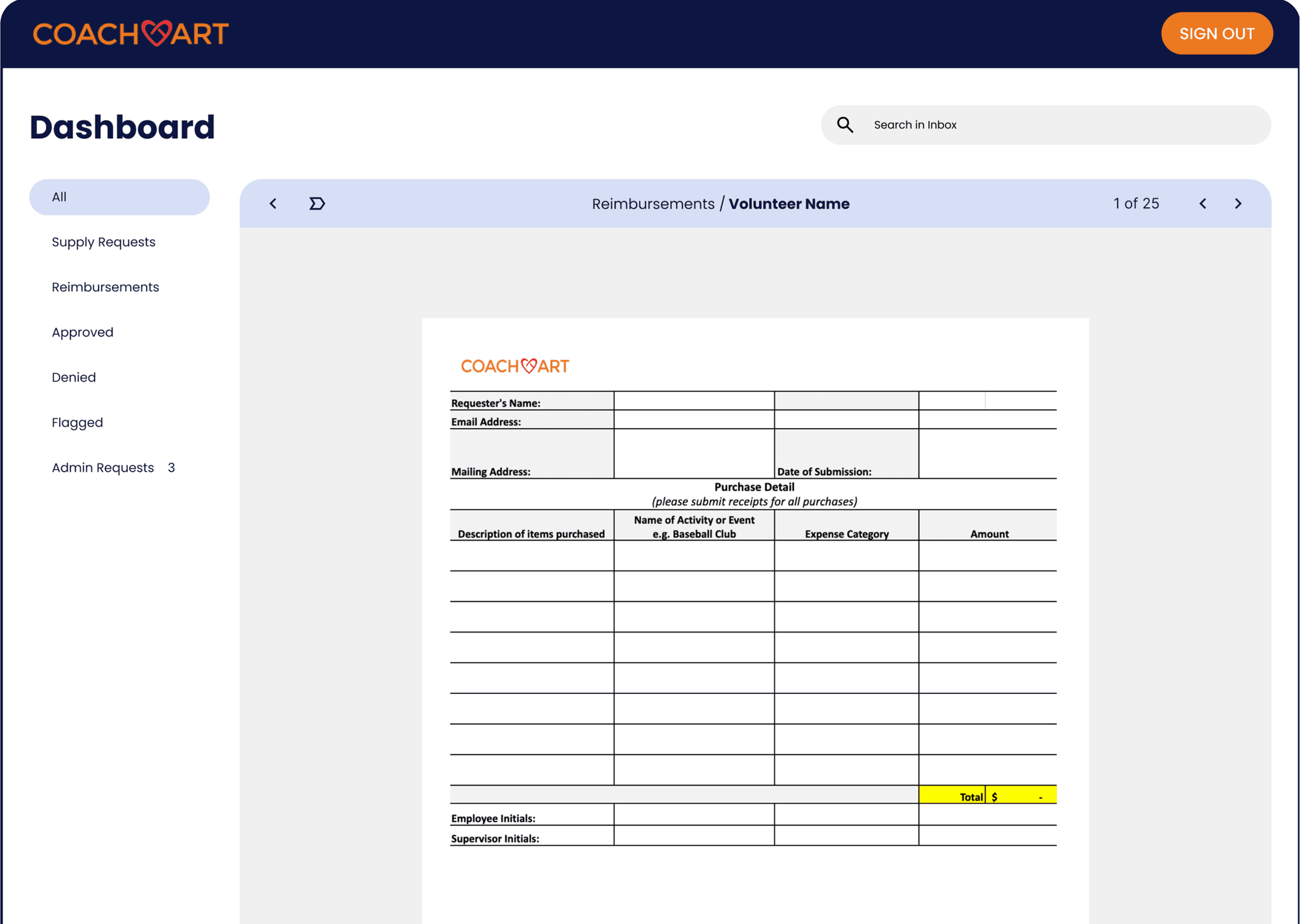
Initially, our product automatically generated a PDF from submitted reimbursement requests for admin review in order to streamline the reimbursement to bill process.
However, we found this limited approval flexibility and most likely caused a framing effect that conditioned admins to be more likely to approve request
Old
New
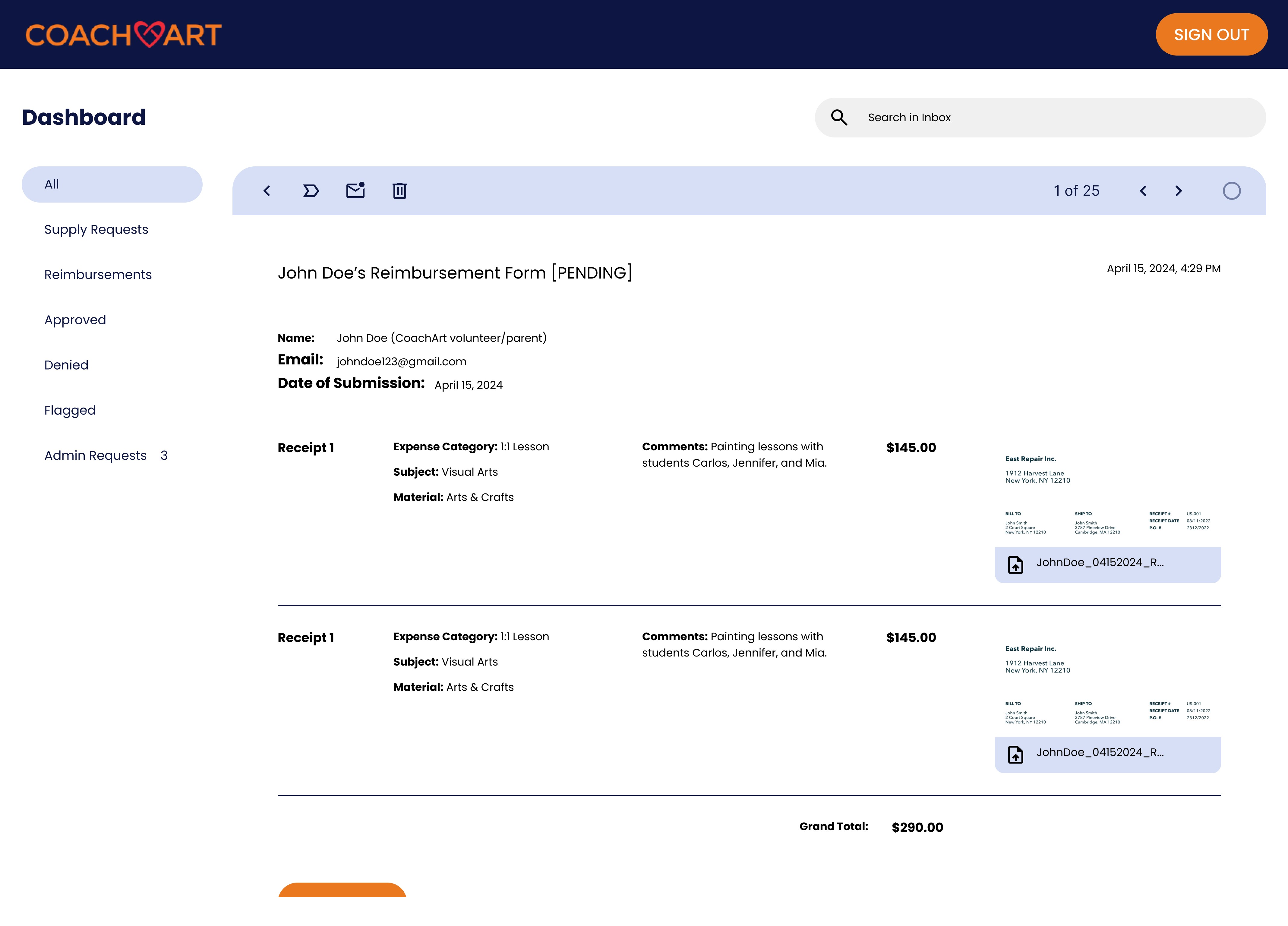
Thus we moved PDF generation to occur after admin approval, allowing admins to interact with and validate information before finalizing invoices. This adjustment ensured proper practice and extra security which we felt was worth the minimal decrease in workflow efficiency.
STyling
Design System
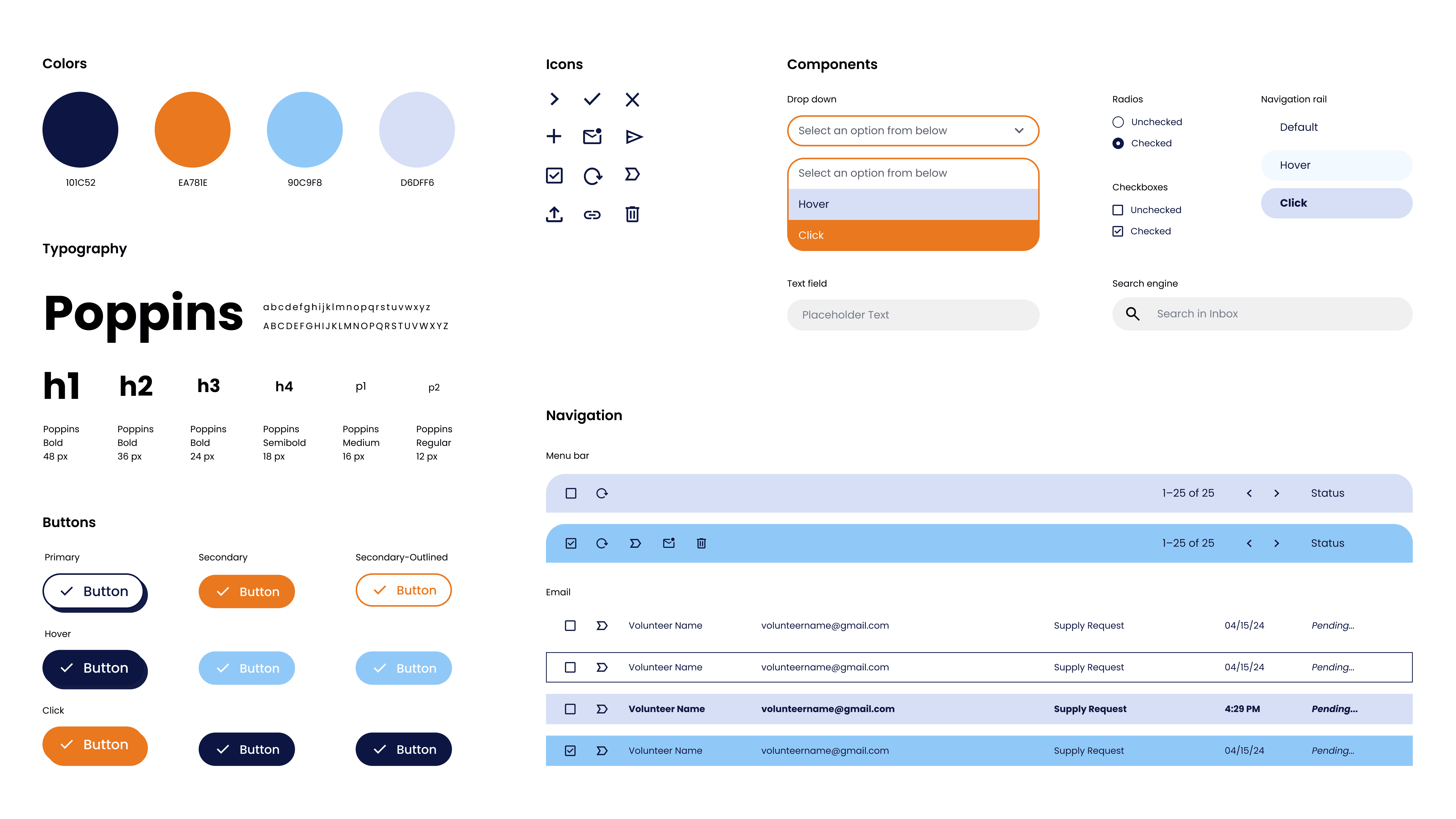
Final product
Reimbursement Request
Design decisions
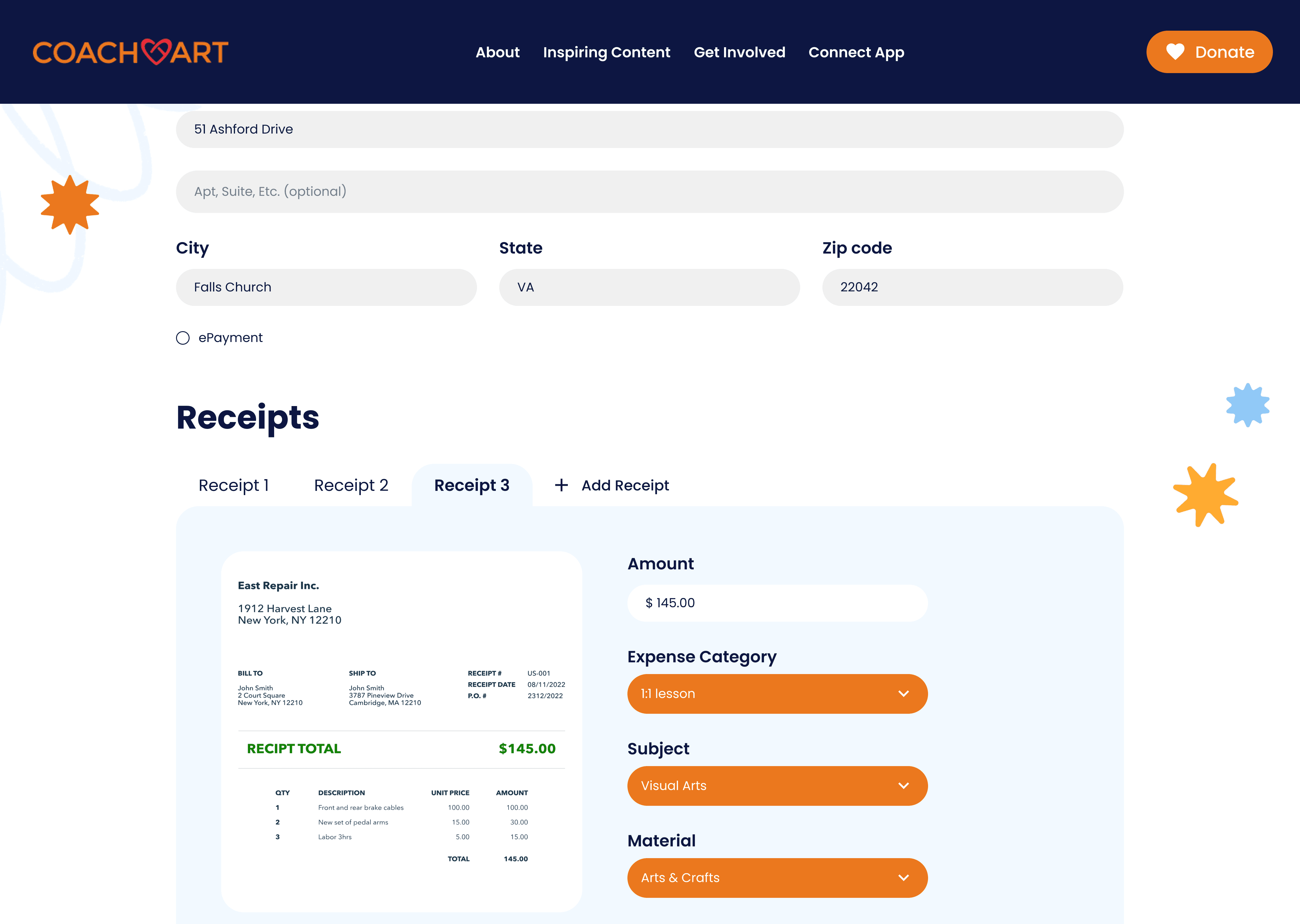
Tabbed workflow
Insight
Users had to backtrack to edit entries.
Design
Each receipt opens its own tab, enabling quick navigation and edits.
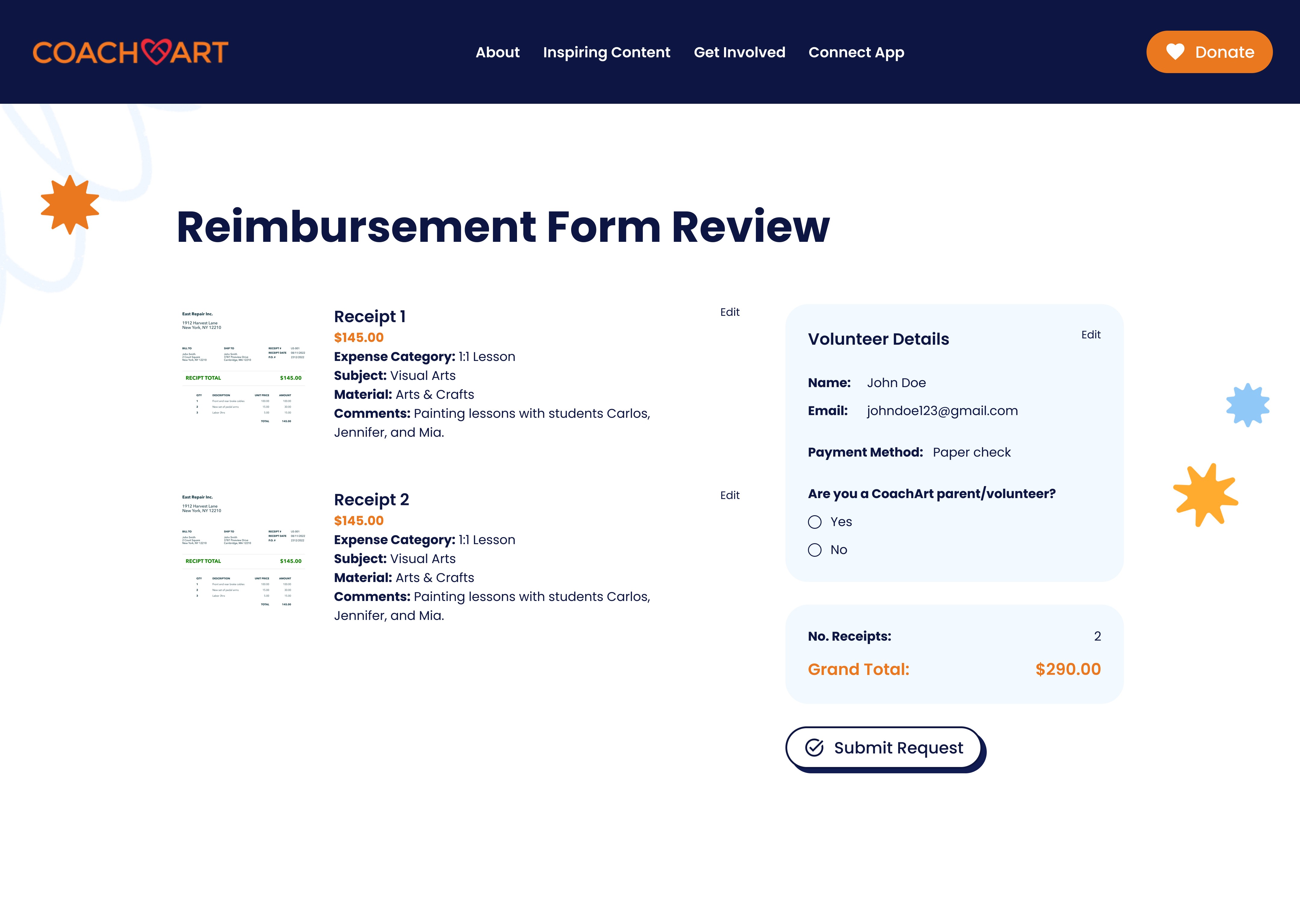
Auto-calculated totals
Insight
Users had to calculate totals across multiple touch points.
Design
A review screen automatically sums all receipts.
Receipt preview
Insight
Users had to constantly switch views to reference receipts.
Design
Receipt previews allow for seamless data entry.
Supply Request
Design decisions
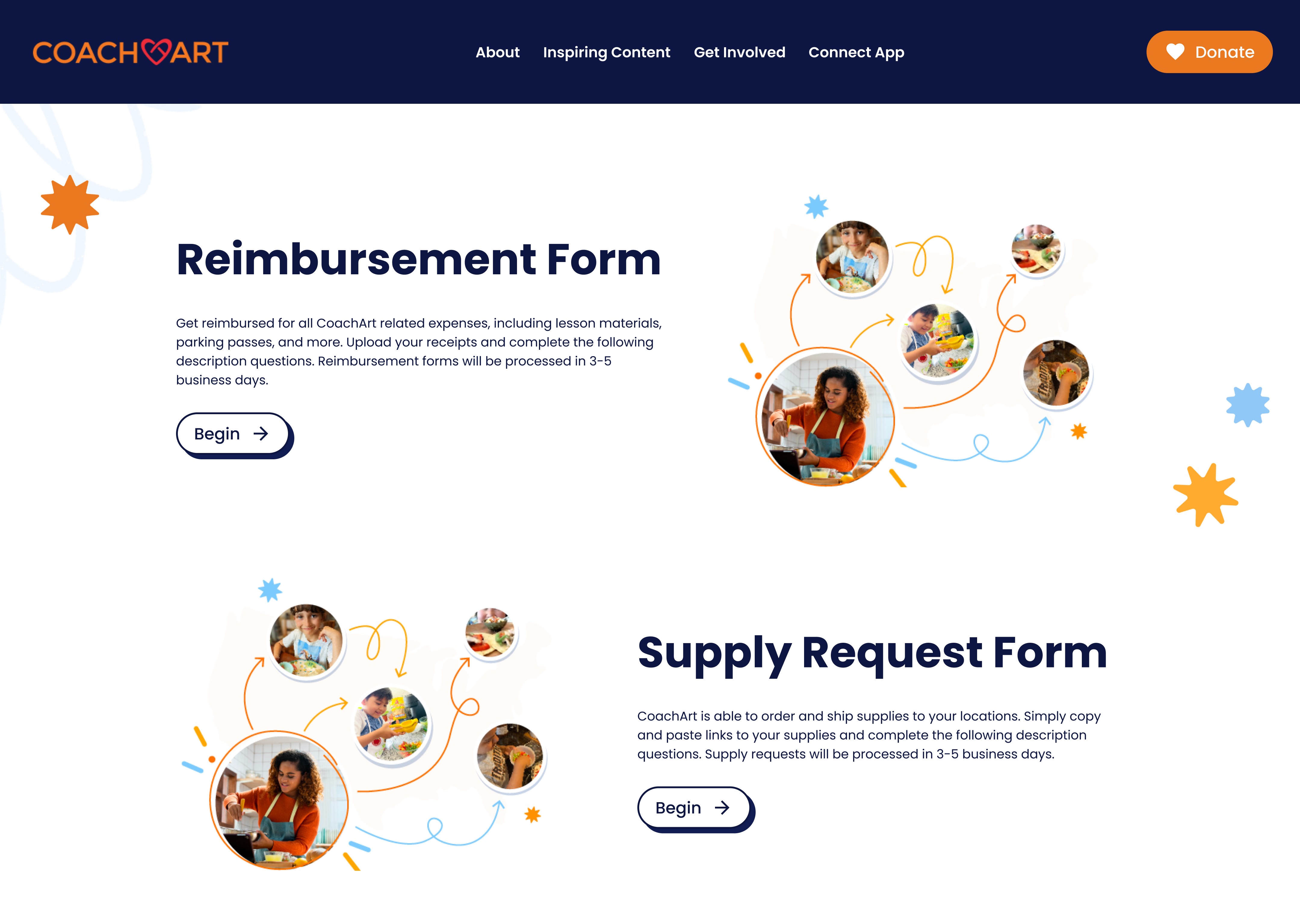
Unified flow
Insight
Users had to submit financial requests fragmented processes
Design
Centralized platform allows for parallel workflows
Link preview
Insight
Users had to paste raw links for admins to purchase from
Design
Familiar e-commerce style aligns with user mental models
Review & submit
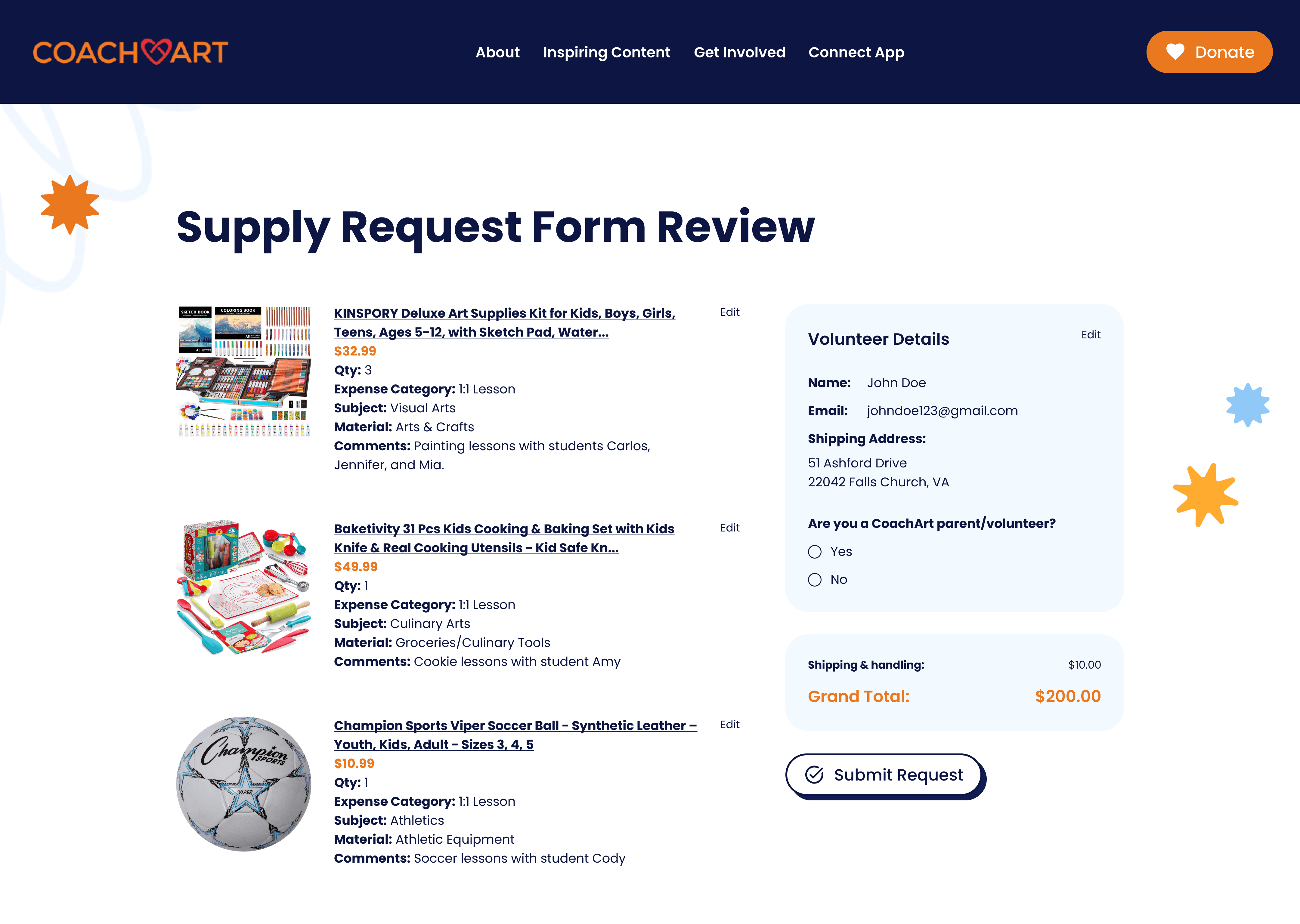
Insight
Users want to know their total cost to check accuracy
Design
A summary page calculates the total and displays all items clearly
Admin Portal
Design decisions
Categorize requests
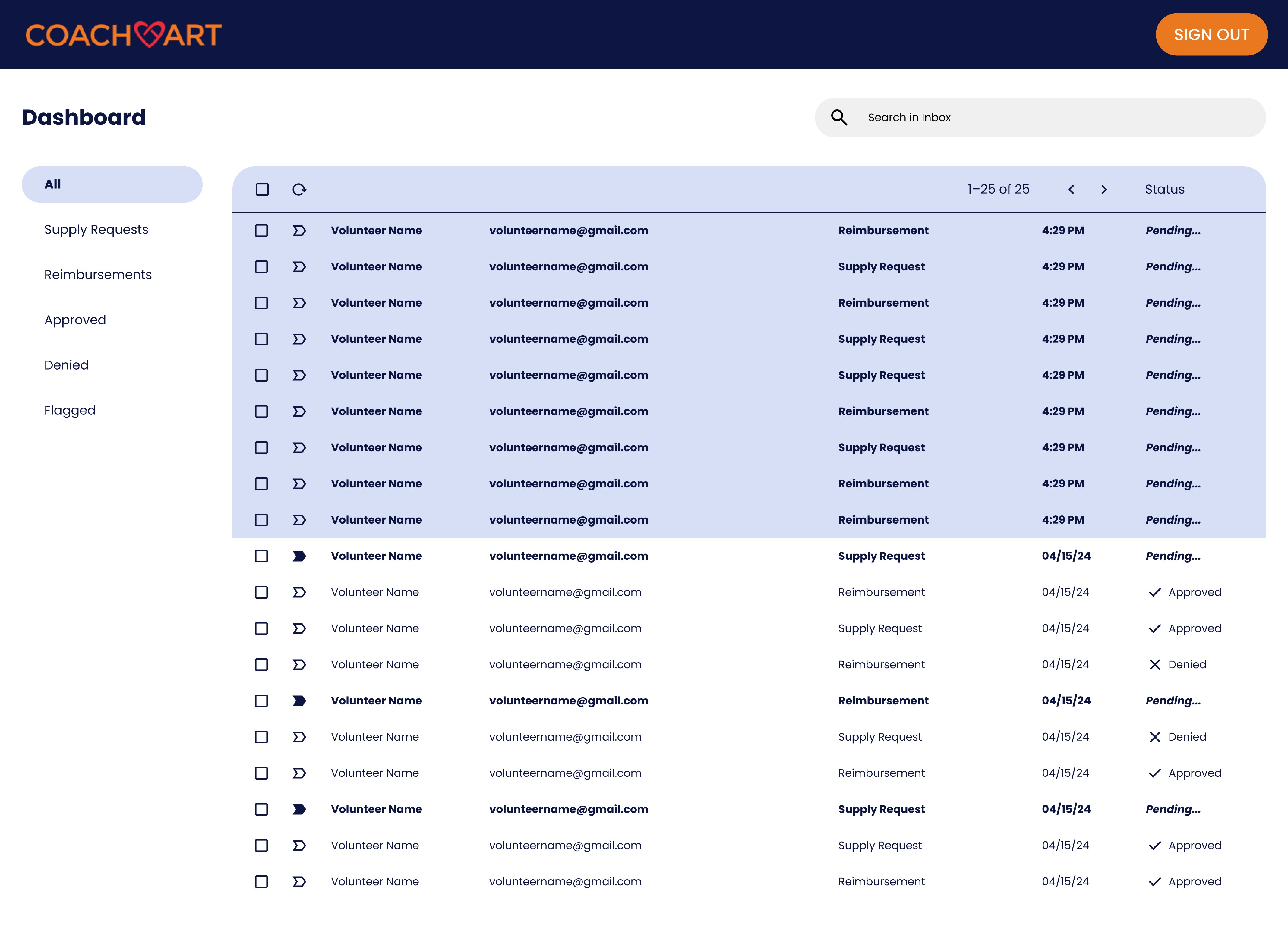
Insight
Admins wanted to reduce manual error when processing requests
Design
Filters, flags, and status chips manage high-volume requests.
Flexible approvals
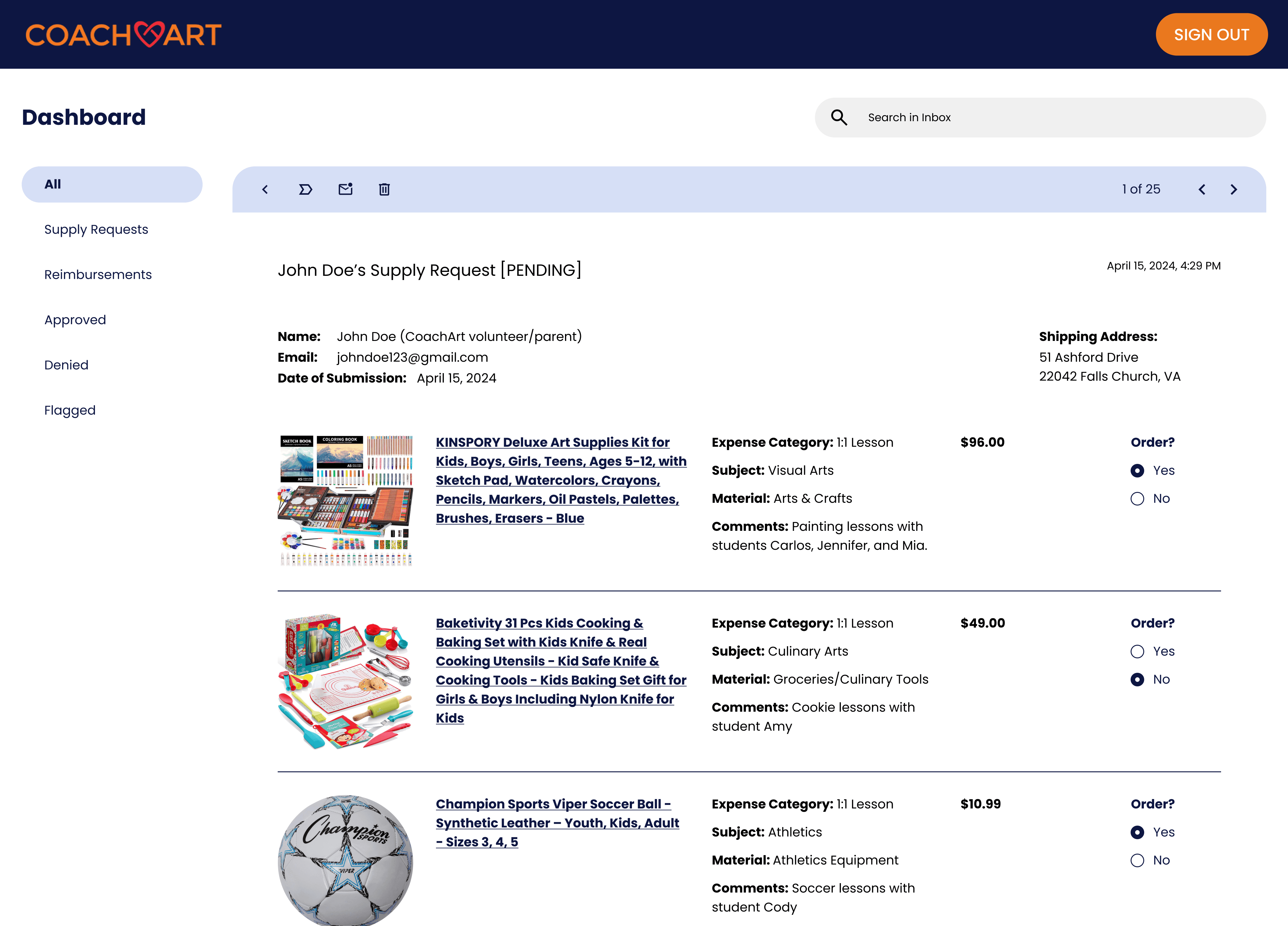
Insight
Admins found it inconvenient to guide users to their errors
Design
Item-level checkboxes send direct feedback
Bill.com integration
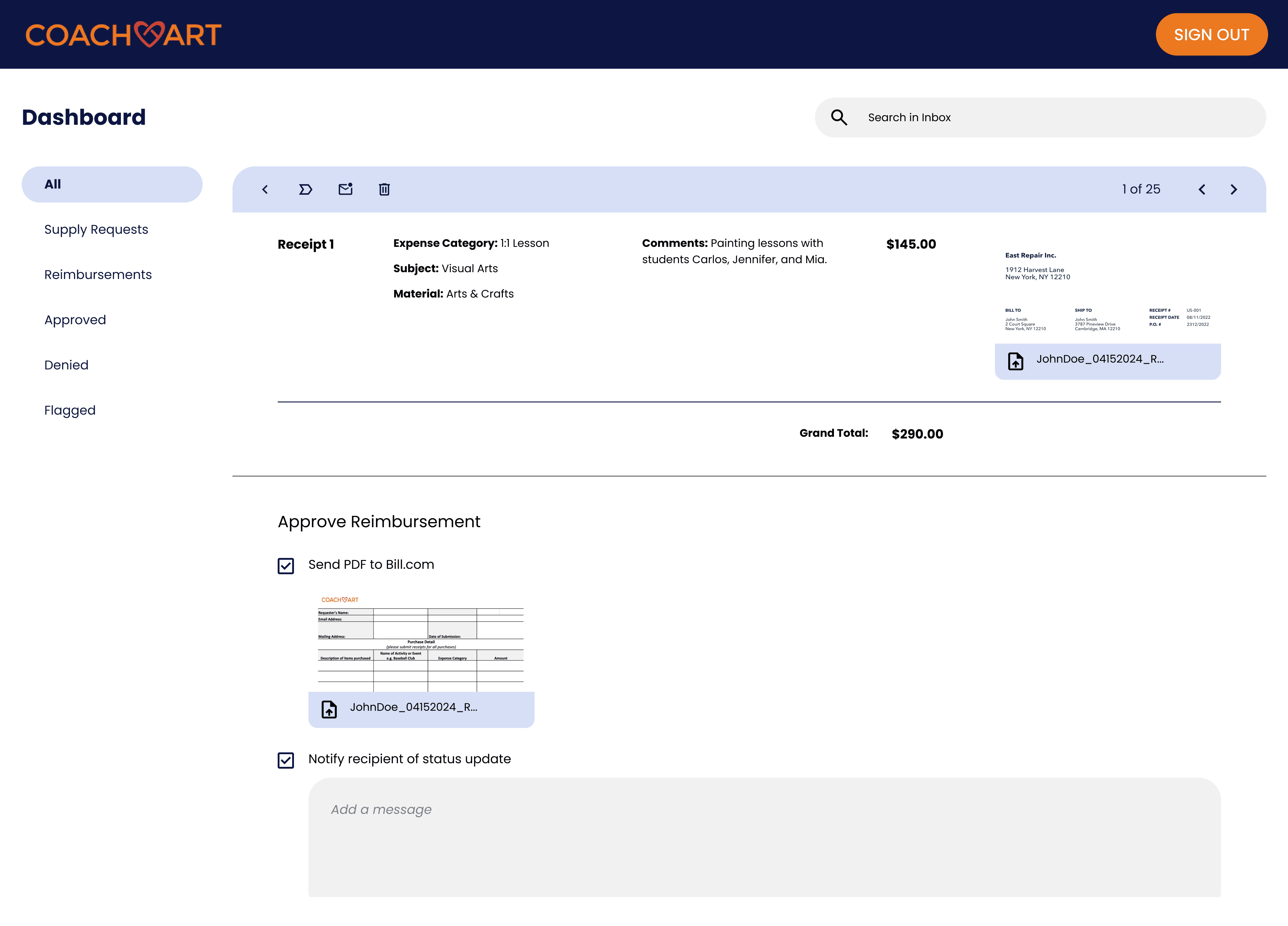
Insight
Admins manually copy each entry into Bill.com
Design
Built-in PDF generation syncs with Bill.com’s APIs for seamless invoicing